How we overcame our sticking points to make our client projects run more smoothly


In this post, we wanted to discuss how we’ve overcome barriers in our project management and planning processes, and the steps we’ve taken to make our client projects run as smoothly as possible. Nothing’s perfect, of course; however, there are some insights we’ve learned along the way that may be of use to those who manage projects in their own teams. Have a read to find out more…
TLDR: We talk a bit about our own project management and planning issues, and how we fixed them, with (hopefully) some useful takeaways to help you, the reader
Getting our project management and planning strategies in order

We couldn’t start implementing good project management strategies for our clients without getting things sorted in-house. In 2025, we worked with a Project Management Coach to overhaul both our internal and external planning processes for how we manage our core web design and build projects.
Some of the key processes we wanted to improve included optimising how we define clear milestones, build better internal review procedures, and boosting our communication with clients and how we collaborate with them.
We reached a point where we became frustrated with our working process and how things could overrun, particularly with regards to project sign off. It felt like something we struggled with for a long time, always thinking “it’s the project management tool.” This meant we jumped from tool to tool to fix the problem; in the end, though, we realised it’s not the tool, but the process – or lack of a clear one, at least.
“If the process isn’t there, no project management tool can magically fix that. Every agency works differently; the templates Angela set up within Teamwork meant that when we get a new client, we can fire it up and know we’ll always have a solid foundation to work from.”
Bringing in some outside help
We hired a Project Management Coach called Angela to help us look at our project management strategy. At that point, we’d been using Notion for a while: we found it very messy, as it has almost too much flexibility, and it required a lot of admin to keep on top of it.
This work with Angela began with a big discovery phase where she mapped out our entire project process from end-to-end: right through from discovery, design and development, to launch and how we close a project. She then looked at any pain points within our process, as well as how we run our Bureau+ service for our retainer clients.
This work helped us to identify any problem areas and pitfalls that can crop up in a project. It also allowed us to determine who needed to take ownership of which steps and at what point in time.

So, how did we overcome the process problems we discovered?
After looking at all the milestones within our project process, we could take a step back and see the pitfalls we kept falling into. One of them was the distribution of labour within a project – Tash is heavily involved in both the beginning and end of a website design and build project, for example: holding discovery workshop sessions, and the main design phase, then coming back in at the end for quality assurance (QA) testing. It was really useful to find out ways that Ben, as the main Developer, could get involved earlier in the process to more evenly share out the work.
We now all know what needs to happen as part of this process. It’s had a positive effect on both us and our clients, because we’re more on top of the project management side of things. This work is ever evolving and we’ve identified further ways we could make improvements to streamline our project process. Our main takeaways are to continue to build the habits involved in our new way of working, maintaining them for the long run, mitigating any unexpected delays and putting things in place to be able to do this.

Our new project management tool: Teamwork
Over the years, we’ve tried out many project management tools to maximise our productivity and overcome any process issues we have. The ones we’ve used include Notion, Basecamp, Trello, Asana, Harvest + Forecast and Teamwork.
After learning all about the different project management methodologies and deciding which one best fit our line of work, Angela – our Project Management Coach – performed an audit of a group of project management tools with our unique requirements in mind. We ended up settling on Teamwork as our project management tool of choice. None of the other apps had invoicing capabilities, so it had meant we had to resort to separate tooling for both invoicing and time tracking, which wasn’t ideal. Teamwork brought all of those things into one place – this was one of the deciding factors for going with the app; it’s also much more structured than the other project management tools, but still has enough flexibility to work for what we need.
The app allows us to run every project in the same way. Angela set up templates to help with this, which means our client projects run much more smoothly. With the best will in the world, it’s easy to skip a step when you’re working on a busy project, but these templates mean we don’t forget anything, and are able to maximise both our clients’ time and budgets with the extra efficiency.
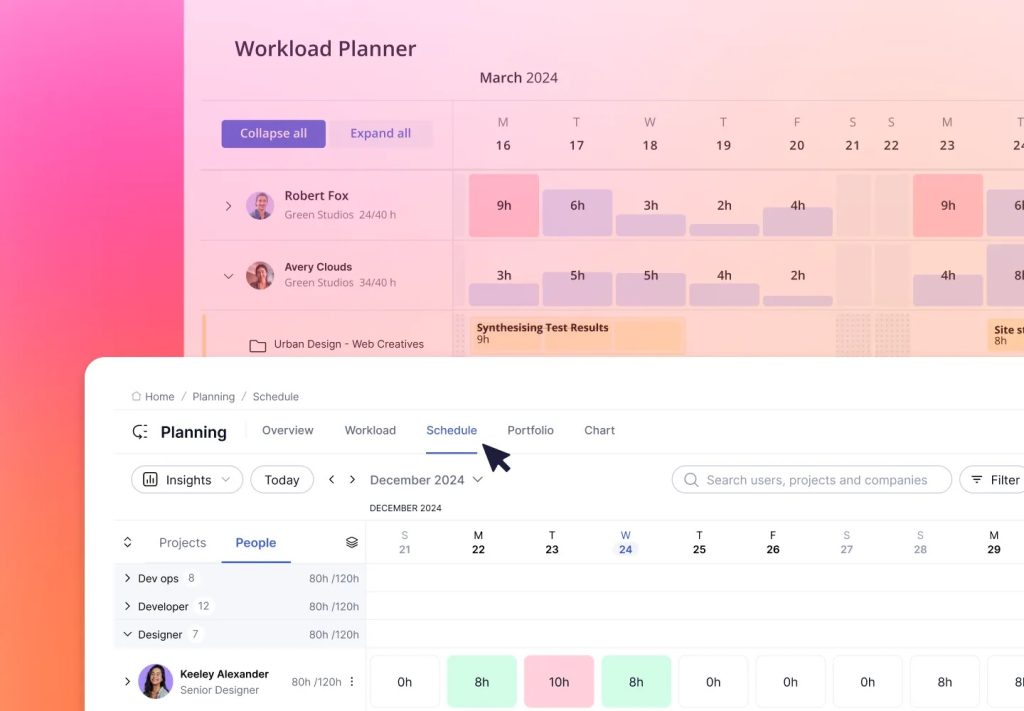
Whenever we begin a project, we’ll start by creating a new project in Teamwork, which generates all the steps in our project process. We can then go in and populate it with data from the client – and later, from events like our Discovery Workshops – with all the tasks required to fulfill the work. Some of our favourite features of Teamwork are:
- The tasks list, where we have templated tasks and stages that are automatically generated, and can then be populated or removed based on the client type and project requirements
- The timeline and time sections, and scheduling area
- The finance section, which allows us to track budget, add project expenses and create invoices
We love how customisable it is without being overwhelming: we’ve created areas for project initiation and set up, the discovery phase, wireframing and design, a place to add and feature the style guide and components, as well as feedback and training. It’s particularly good for managing our Bureau+ clients’ work, as it allows us to see how much allocated time they have remaining from their monthly budget.

Bringing clients along for the ride
There’s a common misconception that there isn’t much for clients to do as part of their website project other than provide feedback. However, this is very far from the truth! It can sometimes come as quite a surprise, which is why we like to give our clients as much info upfront when we bring them onboard so they’re prepared for things like:
- Content creation
- Providing website assets (where appropriate)
- Uploading content to their content management system (CMS – where this isn’t part of the specifications for us to handle)
- Handling deadlines and conversations internally for their organisation
- Providing feedback
- Signing off on both smaller aspects of the project and the website as a whole
To help keep clients in the loop and to give them a place to communicate and get involved in the project digitally, we invite them into their own area in Teamwork. This allows them to access their project milestones, and we keep all communication in one easy to find place. No more messing around in your inbox trying to find a particular piece of information!
Conclusion
This new way of working has had a very positive impact on us. This is particularly true with time tracking for retainer clients on our Bureau+ service. Not only has it been a chance to look at the health of our planning and project process, it’s also an excellent way to spot any potential sticking points or risks within, and put things in place to mitigate them.
If you’d like to find out how we can help you with your next project, why not book a discovery call with us to see how we work?
